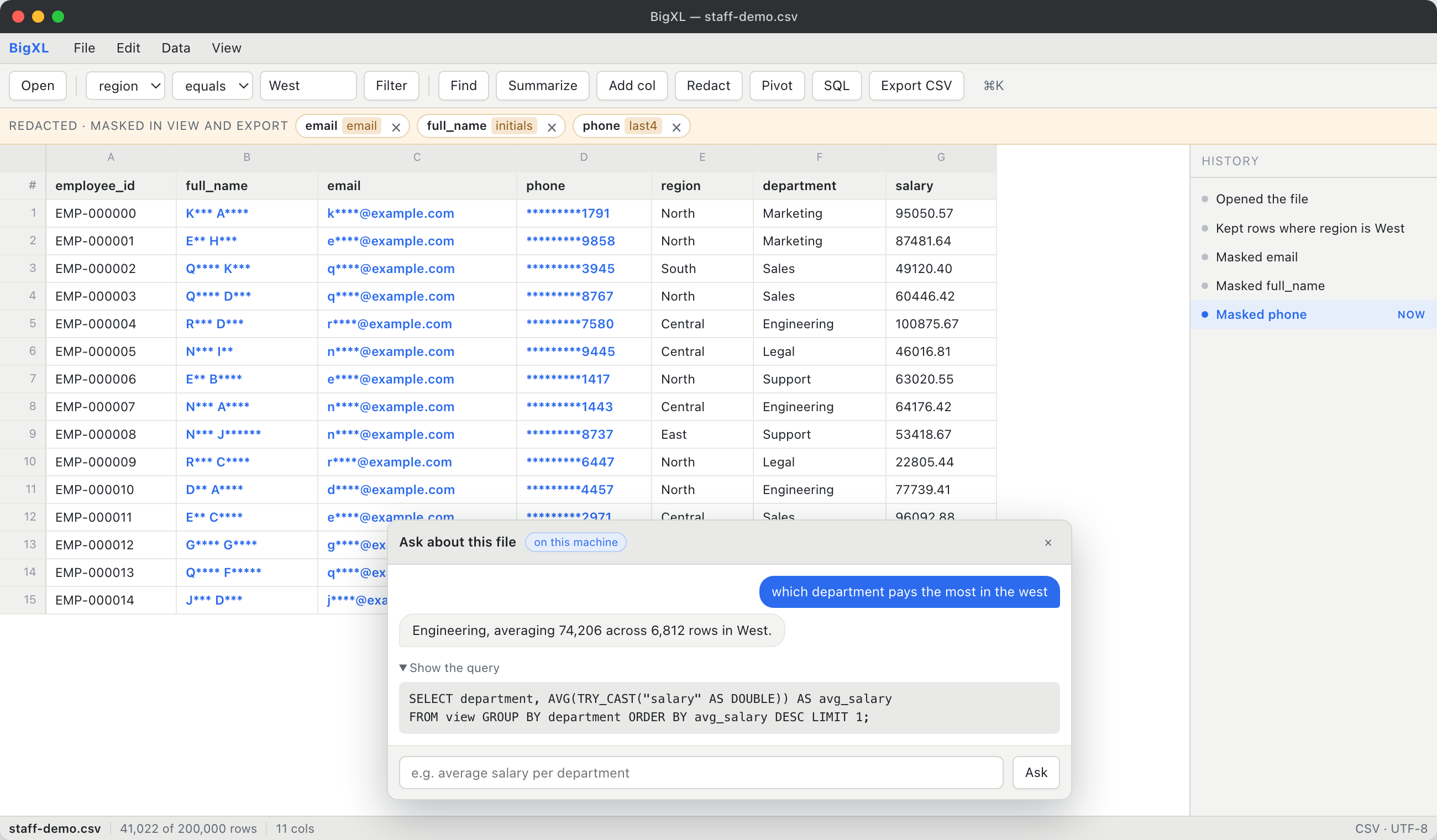
A real spreadsheet for files Excel cannot open. Ask a question in plain English and get the answer with the SQL behind it, from a small language model we fine tuned ourselves and ship inside the app. Your data never leaves your machine.
For the 2 GB export that freezes Excel, and the policy that says it cannot be uploaded to fix.
Builds are not published yet. All three platforms ship together.
The assistant
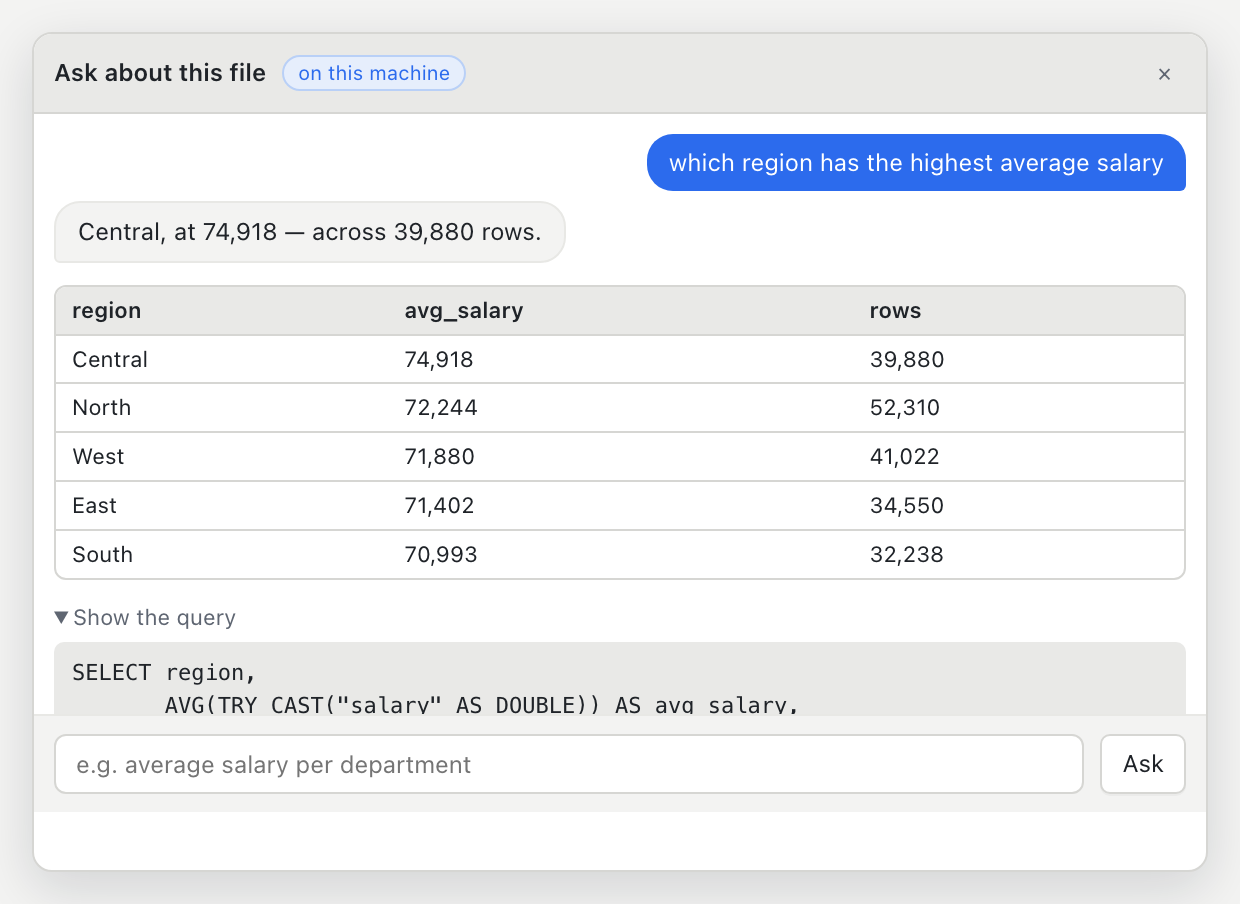
Two small language models ship inside the app. One reads intent, and the other is aLoRA fine-tune trained specifically to write DuckDB SQL. Ask a question and you get the answer, the table, and the exact query it ran. Nothing is uploaded, because nothing needs to be.
SQL console
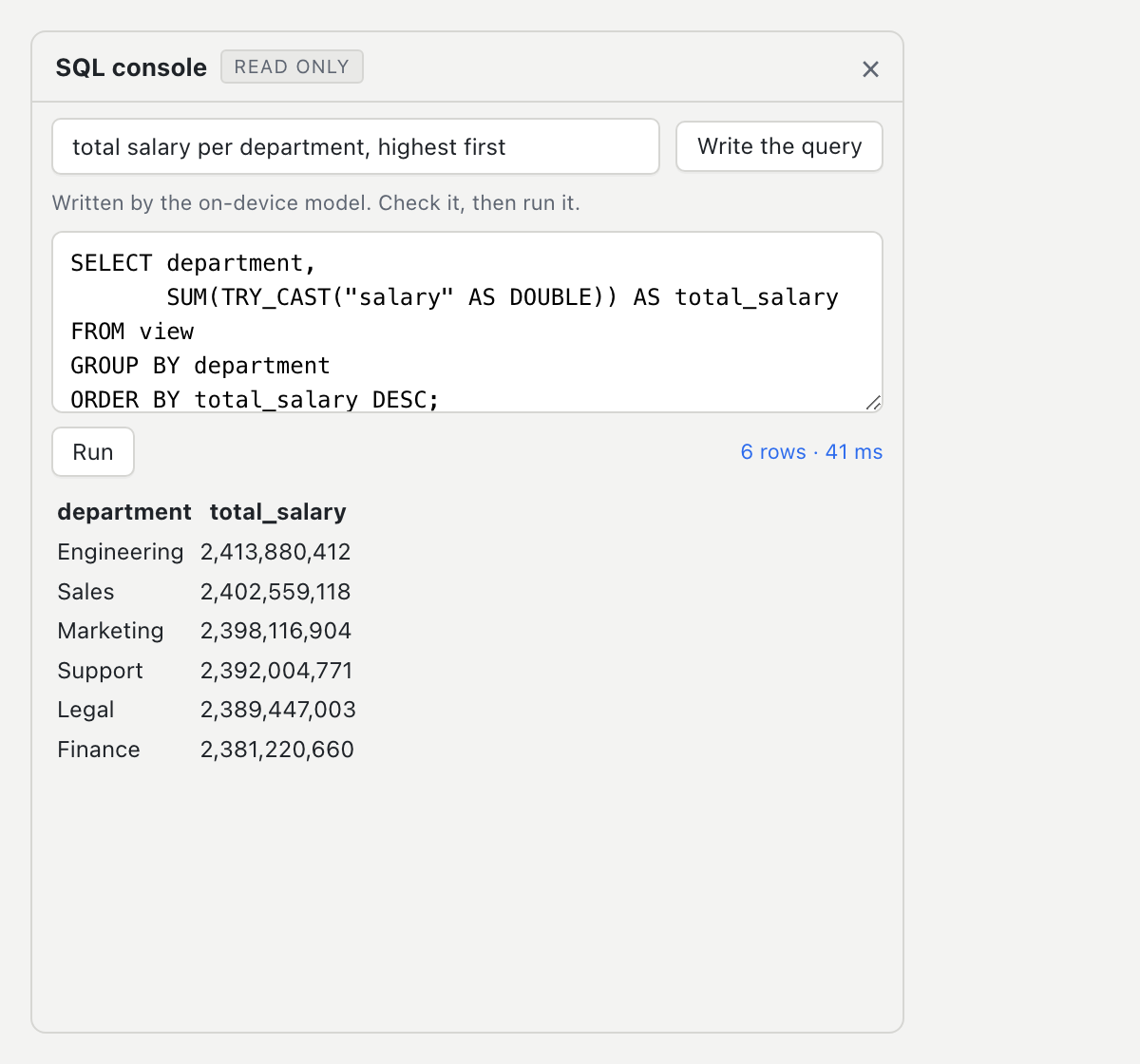
A read-only SELECT against the current view, filters and masks and all. Describe what you want and the model drafts the query; edit it, run it, export the result. It is kept deliberately separate from the timeline so it can never mutate your data by accident.
The moat
Everything else here exists because the file is too big for the tool you'd normally reach for. BigXL never loads the file into memory. It streams an index so rows appear in seconds, while a columnar engine ingests in the background. Nothing you do re-reads the whole file.
A sparse, quote-aware index streams the file so you can scroll and read while the rest is still being processed. No import dialog, no progress bar to sit through.
Sorting 50 million rows doesn't re-sort on every scroll. The ordered view is materialised once, then read by position, so paging through row 40,000,000 costs the same as row 40.
Disk-backed columnar storage with a memory ceiling and spill to disk. A 10 GB file on a 16 GB laptop is the normal case, not the stress test.
1,048,576 rows is a hard wall in a spreadsheet. Here it only matters at export time, and then you get one workbook split across sheets, header repeated, automatically.
Why not the others
The fast viewers open the file but can't analyse it. The database clients analyse it but assume you speak SQL. The cloud tools will answer your question in plain English, but they require you to upload the file first, which for anyone touching regulated data ends the conversation. BigXL does all three, and the language model runs on your own machine.
A viewer that opens the file but can't group it sends you to Python. A database client that can group it wants a schema, an import step and a query you already know how to write. A cloud tool that answers in plain English wants your data on someone else's server. Each is a reasonable tool with one gap that matters, and it is always the gap that costs you the afternoon, or the compliance review.
Redaction
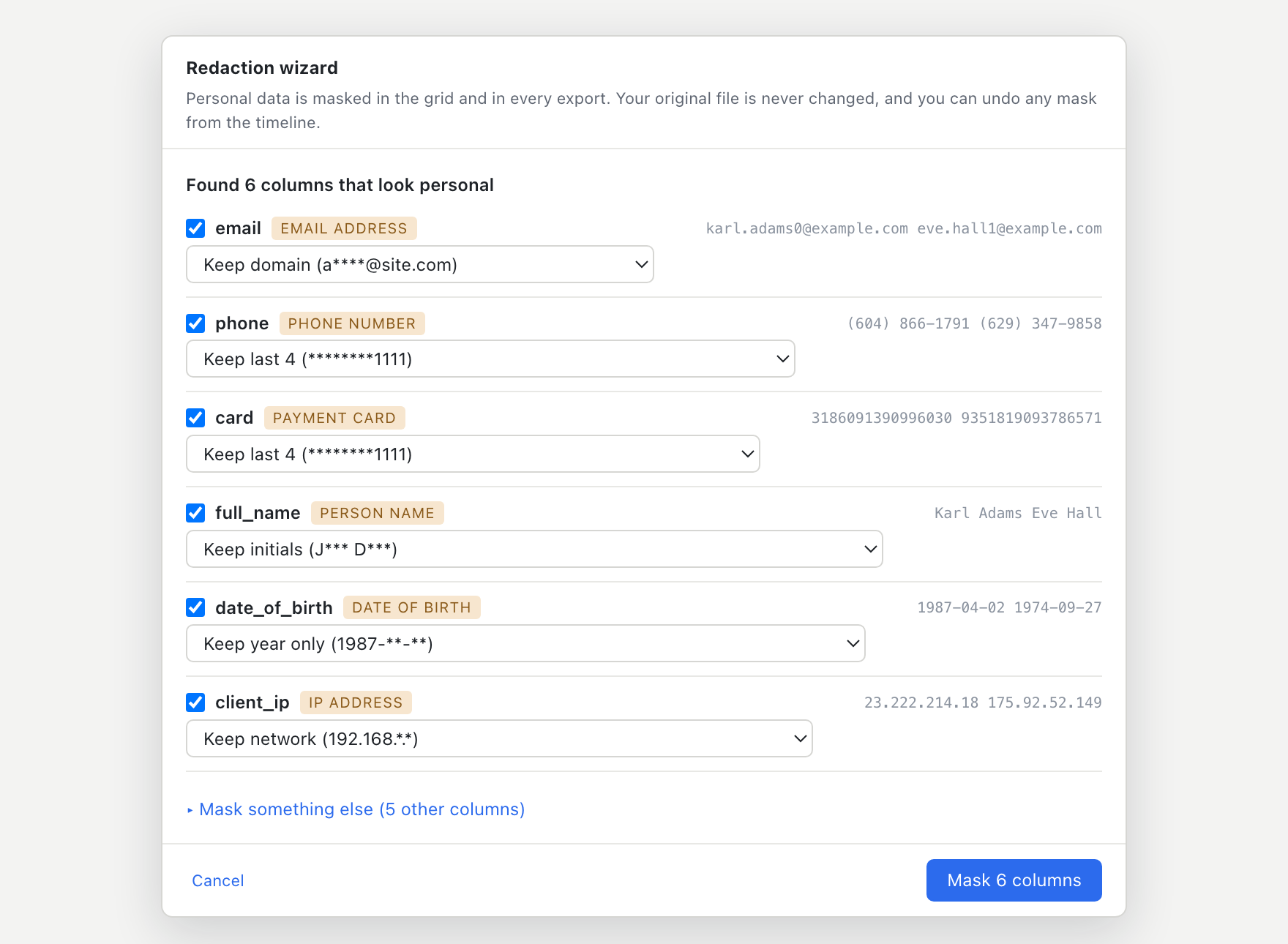
One click finds every column that holds personal data and shows you exactly what it will look like afterwards. Nothing is guessed: card numbers are checked with Luhn, IBANs with mod-97, Aadhaar with Verhoeff, IPs by octet range. It flags real PII, not anything that happens to look numeric.
History & time travel
Not a linear undo stack. A branching history of everything you have done, written in plain English. Filter, mask, replace, dedupe, join: each becomes a step you can click to return to. Your original file is opened read-only and never written to.
.bigxl session file holds the source path, the whole history and your column widths, and warns you clearly if the file moved or changed underneath it.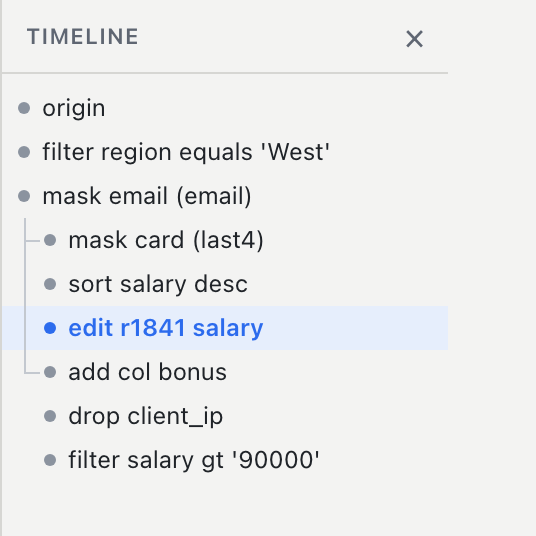
Summaries & charts
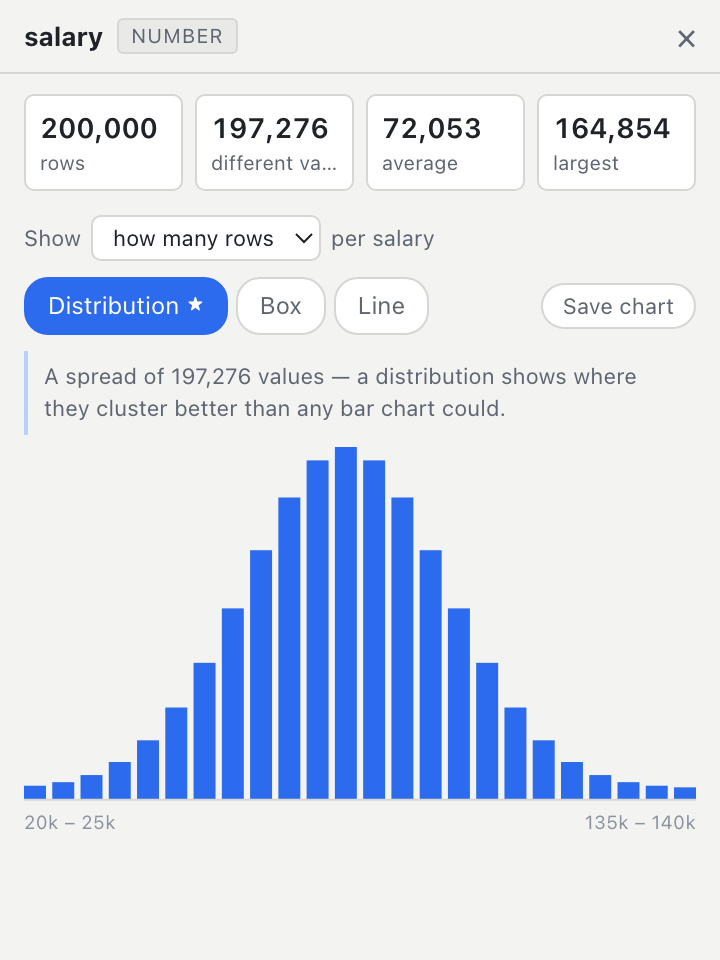
Click a column and BigXL reads its shape, whether that is a whole number, decimal, date, yes/no, category or identifier, then suggests the chart that actually answers the question and explains the choice in one line. The ★ is the suggestion; you can always override it.
Cleaning & reshaping
Everything you would otherwise export the file to do, done in the app, on every row, undoable, and carried through to the export.
One column or all, match case, whole cell. Tells you how many cells will change before it changes them.
Pick the key columns, keep the first occurrence, get told exactly how many rows went.
Strip padding, UPPER, lower, Title Case. One click on the column.
Split by delimiter into new columns, with a live preview before it commits.
Remove selected rows as a real operation, distinct from filtering them out of view.
Paste TSV or CSV at the cursor as one undoable batch edit.
Add a column from a SQL expression such as amount * 1.2, upper(email). Validated before it applies.
Rows × columns × one measure, with totals, as a real grid. Exports like any other view.
Pick the keys and the join type. See match and miss counts before you commit.
Early access
BigXL is close to release and we want it tested on real files, not our sample data. The questions take about a minute. Every answer changes what we build next, and which platform we sign first.
One minute. Your email is used to send you the build and nothing else.
Privacy
Most tools that can answer a question about your spreadsheet need your spreadsheet first. BigXL does not. The file is read from your disk, the model runs on your processor, and the app never opens a network connection. There is nothing to opt out of, because there is nothing being sent.
Opened from disk, read in place, never copied to a server. A 40 GB file is not going anywhere, and neither is a 40 KB one.
No login, no licence server, no seat count. Install it and open a file.
No usage analytics, no crash pings, no phoning home. We cannot see your columns because we never receive them.
The assistant is not a wrapper around someone else's API. Both models ship in the app and run locally, so a question about salaries stays between you and your laptop.
Every edit lives in an overlay. The source CSV on disk is untouched until you deliberately export.
Personal data is masked where the data is read, not where it is drawn. A value that is masked on screen cannot reach an export, and there are tests that fail if it ever does.
This is not a setting you have to find and switch on. It is how the product is built, and it is why it can be used on files that legal, healthcare and finance teams are not allowed to put anywhere near a cloud tool.
Everything else
Two paths through every feature: a menu and a wizard if you've never written a formula, a palette and a keyboard shortcut if you live in one.
Rows appear while the file is still being read. No import dialog, no waiting for a progress bar to finish.
Contains, equals, greater than, and more, across the whole file rather than just what is loaded. Sorted reads stay under a millisecond at 50M rows.
Type over any cell, drag-fill down a column. The source file is never modified.
F2Every action becomes a node. Click any point to time-travel; acting from an older node forks a branch.
⌘ZSearch the entire file through the query engine, not a loaded window. Wraps, walks backward, honours case.
⌘FAdd a column from a SQL expression such as amount * 1.2, upper(email). Validated before it applies.
Average salary per department, in plain language. No GROUP BY required.
⌘UExcel workbooks split automatically at the 1,048,576-row limit, header repeated on every sheet.
⌘EFuzzy-matched access to every command, with the keyboard shortcut shown beside it.
⌘KHonest status
Phases 0 through 8 are built and tested: opening huge files, the spreadsheet, redaction, analysis, exports and sessions, cleaning, pivots and SQL, multiple files and joins, and the on-device assistant. What remains is the last mile to a public release.
$1,234.00 strings isn't yet usable as a number, so numeric questions skip it.Built and tested end to end, with over 2,000 automated checks including 420 for the assistant alone. macOS, Windows and Linux ship together, signed and notarised, with no account and nothing that phones home.
Eleven questions, about a minute. We will email you when the build is ready for your platform.